
Scan Facebook Profile for Viruses using Bitdefender Safego

Bitdefender is regarded as the renowned brand in online security from Simple Antivirus protection to Total PC security, yes you can reply on this brand for optimum security levels. Well so recently I just installed windows and gave a try to their free version antivirus, well let me tell you that its really awesome, its simple, fast and really working model, so basically you need to login in order to activate it so when I was activating I came across my dashboard *created free account and I saw many more products in which one was Safego that allows anyone to scan their Facebook profile for viruses and harmful stuff for free.
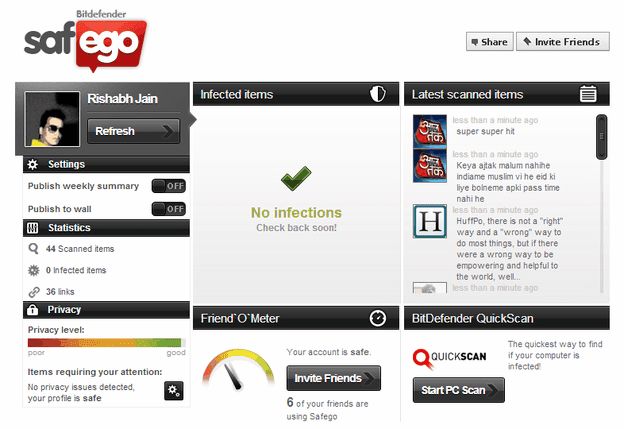
bitdefender-safego
So I just got attracted towards it and I connected my Facebook account with it, well you just need to give access to its app so that it can access your feed and wall and scan it up. So it started scanning my profile, my newsfeed and everything, the report is right above in front of you, well luckily my profile was not poisoned up so I went safe, but maybe your profile can have few viruses or other stuff that might post some bad content from your account to your friends like the scandal happened earlier, so its better to stay safe and use Safego as it automatically removes any harmful stuff and makes your profile clean and green.

Safego Friendly Advice Feature

Safego even provides you with the friendly advice feature with Warn Friends option so if fishy and bad links are posted on their newsfeed then you can warn them too about that so that they can remove that link and make their profile clean too.

On Post Scanning Feature

Now surf newsfeed and even socialize without any worries as Safego scans everything in just 60 seconds interval thanks to their improved scanning technology.
So overall I think it’s a good and easy option to scan your Facebook account for malicious links or spammy stuff without installing anything. So visit Safego now and create a free account and install their FB app to scan your Facebook profile.

Comments

Popular posts from this blog

9 Free & Open Source Forum Software Solutions

Forums can be a great way to encourage audience participation, and to change a website from a one dimensional entity into a full fledged community. There are a number of well developed open source forums out there on the web to help you create that, each with their own benefits. This review breaks down some of the best software out there in 2011 with a focus on everything from lightweight forum solutions to the all singing, all dancing heavyweights. Vanilla URL: http://vanillaforums.org/ Features URL: http://vanillaforums.org/features/embed-vanilla License: GPL Runs on: PHP / MySQL / Postgres Vanilla has always prided itself on clean underlying code, bringing together web standards, code reuse and css to create a product that kicks lumps out of 1990′s bulletin software that we’ve become accustomed to on the web. With many of the forum software solutions out there on the web carrying a technical burden of tables and bloatware, Vanilla brings with it a fresh approac...

How to Enable Hidden Options in Windows’ Disk Cleanup Tool

How to Enable Hidden Options in Windows’ Disk Cleanup Tool The  Disk Cleanup tool  has been around in Windows for years. It offers a quick way to remove temporary, cache, and other non-essential files to help you free up some disk space. You can even use it to remove  old versions of Windows  after an upgrade to Windows 10. Disk Cleanup also has several hidden options that you can only access if you run it from the Command Prompt or a custom shortcut. Start by opening the Command Prompt with administrative privileges. Press Windows+X and choose “Command Prompt (Admin)” from the list of commands. At the Command Prompt, type the following command and then press Enter. cleanmgr /sageset:65535 /sagerun:65535 Note that where this command uses the number  65535 , you can actually use any number between  1  and  65535  as long as you use the same number in both places. The reason for this is that the  cleanmgr  command offer...

50 Amazing PC Hacks Which You Don’t Know

Today I am going to share  50 Amazing PC Hacks & Tips  which will make you Pro users  of your  windows 7, 8, 8.1, 10   Laptop or PC ,  these  amazing hacks  will help you in your daily tech lifestyle , I hope you don’t even heard of these kind of  50 secrete PC hacks at any social media platform , so let’s begin with  Amazing PC tricks  50 Amazing PC Hacks  #1 How To Access Your Folder As a Drive Go to start> run> cmd In command prompt, Type:  subst Z: D:\folder then hit Enter… You can replace Z: with your desired New Drive Letter (Except existing Drive letters) You can replace D:\folder with the path of your favorite folder Now, Type: exit This will creates a new drive & When you open this , it will open your folder. NOTE: On Restart the Virtual Drive Disappears . #2 How To Create Folder And Files With No Name This Hacks will allow...